Elementor is the most popular WordPress page builder in the world, and its free version alone powers millions of websites. But the moment you hit a limitation – a header you cannot customize, a form you cannot build, a popup you cannot create – the upgrade question appears: is Elementor Pro worth paying for? The honest answer depends entirely on what kind of site you are building. This guide compares Elementor Free vs Pro feature by feature, breaks down the pricing, and gives you a clear verdict for beginners, bloggers, freelancers, and store owners.
What Do You Get with Elementor Free?
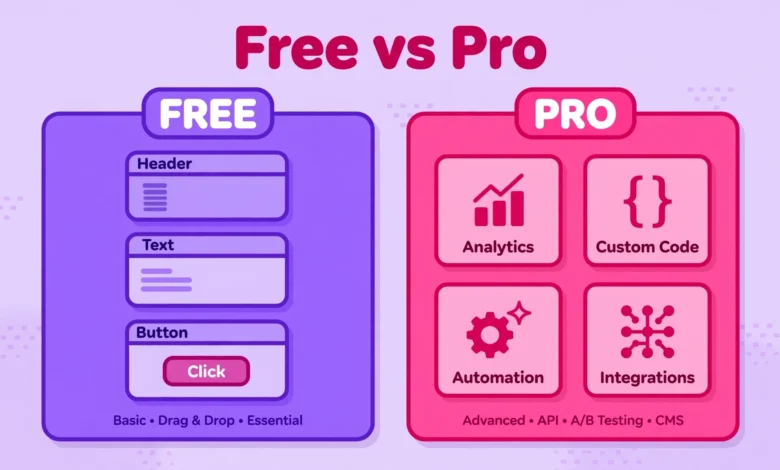
Elementor Free is a genuinely capable page builder, not a crippled demo. You get the full drag-and-drop editor, responsive editing controls, around 40 basic widgets (headings, images, buttons, videos, testimonials, and more), and access to a library of page templates. For a personal blog, a portfolio, or a simple business site with a handful of pages, the free version is often all you will ever need. If you are just starting out, our tutorial on editing the header in Elementor free shows how much you can already do without paying anything.
What Does Elementor Pro Add?
- Theme Builder – design your header, footer, single post templates, and archive pages visually. This is the single biggest reason people upgrade: the free version cannot touch these theme-controlled areas.
- Form Builder – create contact forms, quote forms, and email signup forms with integrations for popular email marketing tools.
- Popup Builder – build popups, slide-ins, and announcement bars with display conditions and triggers.
- WooCommerce Builder – customize product pages, shop archives, and checkout pages (available on Advanced plans and up).
- 90+ Pro widgets – pricing tables, countdown timers, carousels, portfolios, login forms, and more.
- Custom CSS and motion effects – per-widget custom CSS, sticky effects, and advanced animations.
Elementor Pro Pricing in 2026: Is It Expensive?
Elementor Pro is sold as an annual subscription with tiered plans based on how many sites you can use it on, starting from a single-site plan. Prices change over time, so check Elementor’s official pricing page for current numbers, but expect roughly the cost of a decent shared hosting plan per year. There is no lifetime deal and no free trial of Pro itself – though the free plugin lets you test the core editing experience before spending anything. If budget is tight, remember that a good host matters more than a page builder upgrade; our web hosting guide explains where your money makes the biggest difference first.
Who Should Stay on Elementor Free?
- Personal bloggers – you publish written content; your theme already handles the header and footer fine.
- Beginners learning WordPress – master the free version first. You will know exactly which Pro feature you need when you hit its absence.
- Simple portfolio or brochure sites – a few pages with text, images, and a contact button need nothing from Pro.
Who Should Upgrade to Elementor Pro?
- Freelancers and agencies – the Theme Builder alone saves hours per client project and delivers the consistent, branded result clients pay for.
- Online store owners – the WooCommerce Builder gives you control over product and checkout pages that directly affect sales.
- Marketers and lead-generation sites – popups, forms, and landing page templates are Pro’s home turf.
- Anyone who wants full design control – if you find yourself thinking “I wish I could change the header” more than once a week, that is your answer.
Does Elementor Pro Affect SEO or Speed?
Pro itself does not give you an SEO boost – rankings come from content, structure, and speed, not from which page builder tier you pay for. It can slightly increase page weight because it loads more widgets and features, so pair it with solid performance habits. Our honest take on whether Elementor is bad for SEO and our guide on why WordPress sites get slow both apply here: the builder is rarely the real problem; unoptimized images and cheap hosting usually are.
The Verdict: Should Beginners Buy Elementor Pro?
Start free. Build your site, publish content, and learn the tool. Upgrade the moment a specific Pro feature – almost always the Theme Builder or the Form Builder – becomes something you need rather than something that sounds nice. For bloggers and simple sites, that moment may never come, and that is fine: the free version is excellent. For freelancers, agencies, and store owners, Pro pays for itself quickly. The wrong move is buying Pro on day one “just in case” and then building the same simple blog you could have built for free.
Free Workarounds for Popular Pro Features
Before you pay, it is worth knowing how far free tools can take you. Many Pro features have solid free alternatives:
- Theme Builder alternative: the “Elementor – Header, Footer and Blocks” plugin by Brainstorm Force lets you build headers and footers with the free Elementor editor. Pair it with your theme’s Customizer for the rest.
- Form Builder alternative: WPForms Lite or Contact Form 7 handle contact and signup forms well. You design the form in the plugin and drop it into any Elementor page with a shortcode widget.
- Popup alternative: free popup plugins exist, though they add another plugin to maintain – weigh that against how often you actually need popups.
- More widgets: free addon packs like Ultimate Addons for Elementor (free version) or Essential Addons add dozens of widgets to the free editor at no cost.
The honest trade-off: each workaround adds a plugin, and every plugin adds maintenance, update risk, and a little page weight. One well-maintained Pro subscription is often cleaner than five free plugins duct-taped together. Use workarounds while you are learning and earning nothing from the site; consolidate to Pro when the site starts paying for itself or when client work demands it. That is the pragmatic path most freelancers actually take: free tools to learn, Pro tools to earn. If you want to explore the free version first, grab it from the official Elementor plugin page on WordPress.org and evaluate the core editor for as long as you like before deciding.
One last piece of practical advice: whatever you choose, keep the rest of your stack lean. Page builders get blamed for slow sites far more often than they deserve; in our experience the real culprits are unoptimized images, too many plugins, and underpowered hosting. Get those three right and both Elementor Free and Pro will feel fast.
Frequently Asked Questions
Is Elementor Pro worth it for beginners?
Usually not at the start. Beginners should learn the free version first and upgrade only when they need a specific Pro feature like the Theme Builder or Form Builder. Buying Pro before you need it adds cost without benefit.
Can I build a professional website with Elementor Free?
Yes, for many site types. Blogs, portfolios, and simple business sites can look fully professional on the free version, especially with a good theme handling the header and footer. Pro becomes necessary when you need site-wide design control.
Do I need Elementor Pro for WooCommerce?
Not strictly – WooCommerce works fine with the free version for a basic store. But if you want to visually customize product pages, shop layouts, and checkout pages, the WooCommerce Builder in Pro (Advanced plans and up) is the way to do it.
Is Elementor Pro a one-time payment or subscription?
It is an annual subscription. If you stop renewing, the Pro features stop working on your site (your content stays, but Pro widgets and theme builder templates deactivate). Check Elementor’s official pricing page for current plan details.
Last updated: October 2026.