Discord looks like a chat app, but for a creator it is something much more useful: a room your audience can live in. Social feeds show your work to people for a few seconds and then move on. A Discord server gives those same people a place to talk to you and to each other every single day, and that daily habit is what turns casual viewers into a real community.
This guide explains how to grow a Discord community as a creator in 2026, step by step, with honest numbers and no guru hype. You will learn how to seed the server before inviting anyone, get your first 100 members, design channels that stay alive, onboard people in under a minute, and monetize without turning the place into a sales pitch.
Why Discord Still Wins for Creators in 2026
Every platform promises community, but most of them only offer an audience. Instagram gives you followers who may never see your next post. YouTube gives you subscribers who may never return. Discord gives you members who chose to join a space with your name on it, and that choice changes how they behave. They post, they reply, they show up for events, and they tell friends.
Discord also pays better than almost anywhere else. Discord Server Subscriptions pay creators a 90/10 revenue split, which means you keep 90 percent of what members pay. Compare that with YouTube and Twitch, where the platform takes around 30 percent of membership revenue, and the difference is obvious. A small server earning $500 a month keeps $450 on Discord and only about $350 elsewhere, and that gap grows with every member.
Start With One Clear Promise
Before you create a single channel, write down the promise of your server in one sentence. Not a description of the server, but the outcome a member gets from joining. A server for beginner video editors could promise weekly feedback that turns rough cuts into portfolio pieces. A server for freelance designers could promise a place to find clients and get honest pricing advice. If you cannot state the promise in one sentence, the server will feel vague, and vague servers do not grow.
The promise also decides who you invite and who you ignore. A server that tries to serve everyone serves nobody. Pick one audience, one stage of their journey, and one result. You can widen the promise later, once the server is alive, but a narrow start is what makes the first members feel they belong somewhere made for them.
Seed the Server Before You Invite Anyone
The biggest mistake new creators make is opening an empty server and inviting their whole audience into it. People join, see empty channels, post nothing, and never return. An empty room kills momentum faster than anything else, because nobody wants to be the first person talking to silence.
Seed the server first. Invite five to ten friends, collaborators, or loyal followers privately and ask them to post for a week before the public launch. Give them simple jobs: post an introduction, share one useful link a day, answer questions, and react to each other. When the first real members arrive, they should see conversations already happening, not a blank screen.
Design Fewer Channels, Not More
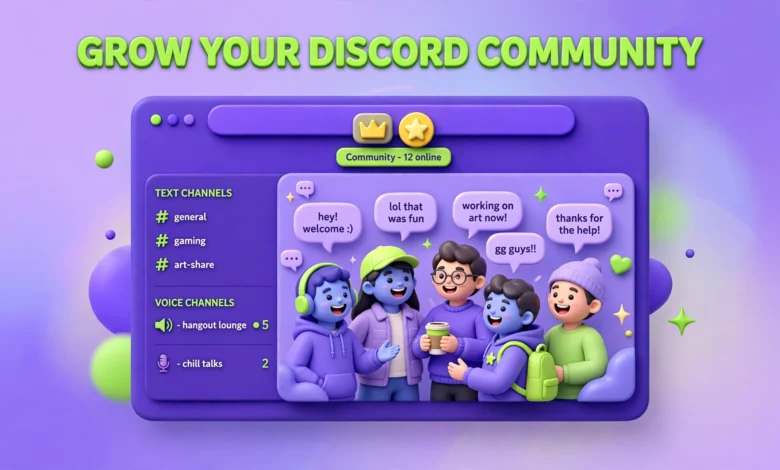
New server owners love creating channels. A channel for every topic, every tool, every day of the week. The result is twenty empty rooms and one busy chat, which makes the server look dead even when people are active. While you have under 500 members, keep a maximum of 10 channels. Fewer rooms mean every room has life in it, and life is what new members look for.
- Welcome and rules: one channel where new members land, read the rules, and know what to do first.
- Announcements: your channel only, for launches, events, and important news.
- General chat: the main hangout where most conversation happens.
- Introductions: where new members say who they are and what they want to learn.
- Showcase: where members post their work and get feedback.
- Questions and help: where members ask for help and others answer.
- Resources: pinned links, tools, and guides your audience keeps asking for.
- Voice lounge: one voice channel for casual hangouts and office hours.
- Off topic: one fun channel so the main chat stays useful.
Your First 100 Members Come From Your Warm Network
Your first 100 members will not come from a listing site or a viral post. They come from your warm network: people who already follow you, reply to your content, or know you personally. These are the only people who will join an unproven server and post in it, and they are the foundation everything else is built on.
Then mention the server in your content, but always with a reason to join today. A video that ends with a link to your Discord gets a few clicks. A video that ends with a live challenge, a feedback session, or a Q and A happening in the server tonight gets members. Give people a specific event to join, not just a place to sit. Our guide to grow on Instagram in 30 days will help you reach more of the warm audience you need for those first invitations.
Make Onboarding Take Under One Minute
Every extra step in onboarding loses members. A new joiner who faces a wall of rules, ten reaction roles, and a long form will close the tab and never come back. Good onboarding takes under one minute and asks at most three questions. The goal is to get the person posting as fast as possible, not to collect data.
- One welcome message: a short post that says what the server is for and where to post first.
- Three questions maximum: who are you, what are you working on, and what do you want to learn here.
- One action: post an introduction in the introductions channel, and you reply to it personally.
- One role choice: let members pick a single role, like beginner or advanced, so they can find their peers.
Get Discovered on Listing Sites
Once your server has real activity, listing sites can bring a steady stream of new members. List your server on Disboard, Discord Me, and Top.gg, three directories where people search for servers by topic. Write a listing that states your promise, your audience, and what happens inside each week, not just a list of features. A listing that says weekly feedback sessions every Thursday beats a listing that says friendly community.
Cross promotion works too, if you do it with respect. Partner with a creator whose audience overlaps with yours but does not compete, and mention each other’s servers once, in a way that helps both audiences. Never drop your invite link in someone else’s server without permission. That behaviour gets you banned and earns your server a bad reputation before it has even grown. For a deeper walkthrough, see the guide at Biolinky on Discord for creators and the 2026 server building guide at Unilink on building a Discord server in 2026.
Rituals Keep People Coming Back
Members do not return because a server exists. They return because something happens there on a schedule they can plan around. Rituals are repeating events that give members a reason to open Discord every week, and they are the single best retention tool a creator has.
- Weekly challenges: one small challenge each week tied to your promise, like a 7 day posting challenge or a first edit challenge.
- Showcase channel: a weekly thread where members post their work and everyone gives feedback.
- Office hours: one hour a week in the voice lounge where you answer questions live.
- AMAs: a monthly ask me anything, sometimes with a guest from your niche.
- Friday wins: members share one win from the week, however small, and celebrate each other.
How to Monetize Without Killing the Vibe
Monetize only after the server is alive. A paid tier in a quiet server sells nothing and makes the free members feel like the real product is behind a wall. Wait until you have at least 100 active members and a weekly rhythm people rely on, then add a paid layer that gives more of what already works, not something completely different.
Discord Server Subscriptions are the simplest option, and the 90/10 revenue split makes them hard to beat. Offer a subscriber role with real perks: early access to your videos, a private channel, monthly feedback sessions, or exclusive resources. Price it low at first, around $5 to $10 a month, so the decision is easy, and raise it later for new members once you have proof it is worth it.
Two other routes work well. Patreon linked tiers let you sell memberships on Patreon and sync the roles to Discord automatically, which suits creators who already have Patreon supporters. Whop lets you sell access, courses, and digital products through Discord with built in payments, which suits creators who want a shop attached to their server. For a full comparison of paid community platforms, our guide to start a paid community as a creator in 2026 breaks down the prices and trade offs.
Hire Moderators Before You Need Them
Moderation is not a chore you add later. It is the culture of your server, and culture is set in the first hundred members. Write short clear rules before launch: be kind, no spam, no self promotion without permission, and no hate of any kind. Enforce them evenly from day one, even with friends. One unpunished troll teaches the whole server that the rules are optional.
Hire moderators before you need them. By the time you have 1,000 members, aim for a 2 person mod team you trust, chosen from your most active and most level headed members. Give them clear powers and clear limits, a private mod channel, and your thanks in public. Good moderators are worth more than any bot, because they understand context and they care about the community.
Frequently Asked Questions
How many channels should a new Discord server have?
Keep a maximum of 10 channels while you have under 500 members. Fewer rooms mean every room has life in it, which makes the server feel active. Add a new channel only when an existing one gets crowded with real conversation.
How do I get my first 100 Discord members?
Your first 100 members come from your warm network, not from listing sites. Invite your most engaged followers personally, seed the server with five to ten friends posting for a week first, and give people a specific event to join, like a live challenge or a feedback session.
How much money can I make from Discord Server Subscriptions?
Discord pays a 90/10 revenue split, so you keep 90 percent of subscription revenue. At $5 a month, 100 subscribers earn $450 a month after the split. At $10 a month, 100 subscribers earn $900.
Should I use Discord, Skool, or Circle for my community?
Discord suits audiences who want a daily hangout with voice chat and casual conversation, and it is free with a 90/10 subscription split. Skool and Circle suit structured learning with courses attached. Choose the platform your audience already uses, and pick Discord if your audience is young and chatty.
Last updated: November 2026.