Choosing your first WordPress host feels harder than it should. Every host promises fast speeds, great support, and 99.9 percent uptime. Prices look similar at first glance, yet one plan can cost three times more than another after the first year. The wrong choice can leave you with a slow website, surprise renewal bills, and support that takes hours to answer. The right choice gives you a fast start, room to grow, and help when you get stuck.
This guide explains how to choose WordPress hosting in plain language. You will learn the main hosting types, the features that actually matter, how much you should expect to pay, when shared hosting is enough, and when it is time to upgrade. You will also find an honest comparison of three well known beginner hosts, plus the mistakes that cost beginners money.
What Are the Main Types of WordPress Hosting?
WordPress hosting comes in four main types that differ in price, speed, control, and how much work the host does for you. The cheapest plan is not always the best value, and the most powerful plan is wasted on a brand new blog.
- Shared hosting: your website shares one server with many other websites. It is the cheapest option and the best fit for most beginners, because the host handles server setup.
- Managed WordPress hosting: the host handles updates, backups, caching, and security for you. It costs more than shared hosting, but it saves you hours of maintenance.
- VPS hosting: your website gets a guaranteed share of a server with its own resources. It is faster and more stable than shared hosting, but it needs some technical knowledge.
- Cloud hosting: your website runs on a network of connected servers that scale up when traffic rises. It is flexible and powerful, but the pricing can be harder to predict.
For a new WordPress website, shared hosting or entry level managed WordPress hosting is almost always the right starting point. A VPS or cloud plan only makes sense when your traffic or technical needs outgrow shared hosting. For a deeper comparison of the two most common beginner options, read our guide on shared versus cloud hosting for beginners before you decide.
What Should You Check Before You Buy Hosting?
Hosts advertise dozens of features, but only a few affect your daily experience. Use this checklist to compare plans fairly, and ignore features you will never use. A plan that scores well on these points will serve you far better than one with a long feature list and weak basics.
- Speed: look for SSD or NVMe storage, a free CDN, and server level caching. Pick a data centre close to your visitors.
- Uptime: look for a 99.9 percent uptime promise in writing. That still allows about 43 minutes of downtime per month, so anything lower is a warning sign.
- Support: test the live chat before you buy. Ask one real question and see how fast and clearly the agent answers. Good support matters more than any feature.
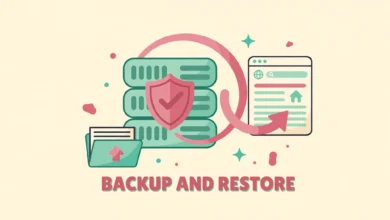
- Backups: check that daily automatic backups are included, not an add on. Confirm that you can restore a backup yourself.
- SSL certificate: a free SSL certificate should be included with every plan. Without it, browsers will warn visitors that your site is not secure.
- One click WordPress install: the host should install WordPress in a few clicks, with no manual database setup.
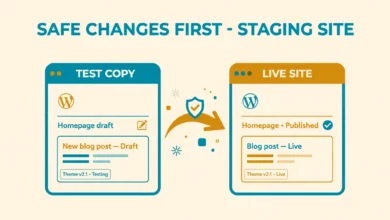
- Staging: a staging copy lets you test changes safely before they go live. It is a bonus now, but it becomes important as your site grows.
Also check the renewal price, not only the first year price. Many hosts sell the first year at a deep discount and then charge two or three times more on renewal. Find the renewal price on the pricing page or in the checkout summary before you pay. A host that hides its renewal price is telling you something about how it treats customers. If you are still unsure how hosting and domains relate, our guide on the difference between a domain and hosting clears up the confusion.
How Much Should a Beginner Pay for WordPress Hosting?
Beginner shared hosting usually costs around two to five dollars per month for the first term, with renewals often rising to around eight to fifteen dollars per month. Managed WordPress hosting usually starts higher, often around fifteen to thirty dollars per month, with renewals in a similar range. These are typical starting prices, not fixed rates, so confirm the live price on the host website before you pay, because promotions change often.
Do not buy the longest term just because the monthly price looks lower. A three year plan locks you in with a host you have never tried. Start with a one year plan, or a monthly plan if the price is fair. After a few months you will know whether the speed and support are good enough. A host with a fair renewal price is worth more than one with a cheap first year and a painful second year. For a full overview of hosting basics and pricing, see our web hosting guide.
Is Shared Hosting Enough for a New Website?
Yes, shared hosting is enough for almost every new WordPress website. A new blog, portfolio, small business site, or hobby store gets very little traffic in its first months. Shared hosting handles that traffic easily, and it leaves money for a good theme, a domain name, and content. Most beginners who pay for a VPS in their first month are paying for power they will not use for a year or more.
Upgrade when you see clear signs, not because a sales page tells you to. Upgrade when pages load slowly even after you optimise images and caching, when your host warns you about resource limits, when traffic grows past a few thousand visits per day, or when you start selling online and need stronger security. A managed WordPress plan is usually the best next step, because it adds speed and support without server management.
Which Beginner Hosts Are Worth a Look?
Three hosts come up again and again. Each one suits a different kind of beginner, and each one has a weakness you should know first. Prices change often, so treat the notes below as a guide to what each host is known for, and always confirm the current and renewal prices on the host website.
Hostinger is known for low starting prices and a simple custom control panel. Its plans usually include a free first year domain, free SSL, and one click WordPress install. The trade off is that the cheapest plans limit resources, and support can be slower during busy hours. Hostinger suits beginners on a tight budget who want a clean dashboard and do not need phone support. Our comparison of Hostinger versus Namecheap for WordPress covers another popular budget choice.
Bluehost is officially recommended by WordPress.org and is known for a smooth setup that takes only a few minutes. Its dashboard guides you through installing WordPress, choosing a theme, and publishing your first page. The trade off is a renewal price that rises sharply after the first term, and checkout upsells that beginners often buy by accident. Bluehost suits complete beginners who want the easiest possible setup and do not mind paying more later.
SiteGround is known for strong support and solid speed, with agents who actually fix WordPress problems instead of pointing you to a help article. Its plans include daily backups, staging on higher tiers, and a clean panel. The trade off is price: SiteGround costs more than the other two, even in the first term, and its storage limits are lower. SiteGround suits beginners who value fast, skilled support and are willing to pay extra for it.
No host is perfect. Pick the one whose strength matches your biggest need: lowest price, easiest setup, or best support. Then check the renewal price, read the refund policy, and confirm the money back period, which is usually 30 days. That guarantee lets you test the host with your real website before you commit.
What Mistakes Do Beginners Make When Choosing Hosting?
Most hosting regrets come from a few avoidable mistakes. Beginners focus on the advertised price and miss the renewal price. They buy add ons they do not need, such as paid backups, paid SSL, or security scans that the host should include for free. They choose a server location far from their visitors, which slows every page load. They pick the cheapest plan and then wonder why the site crawls after they install a heavy page builder and twenty plugins.
- Buying on price alone and ignoring the renewal cost, support quality, and backup policy.
- Paying for add ons at checkout, such as a paid SSL certificate, when the host offers them free on other plans.
- Choosing a data centre far from the people who will read the site.
- Picking the smallest plan for a store or a membership site that needs more resources from day one.
- Skipping the refund policy, then feeling stuck with a host they dislike.
Slow hosting also hurts your search rankings, because Google uses page speed as a ranking factor. Before you launch, work through our WordPress website launch checklist and our WordPress SEO checklist for beginners. Both guides assume a basic shared plan, so they show what is possible without a premium host.
How Do You Move Forward After Choosing a Host?
Once you pick a host, the next steps are simple. Buy the plan for one year, use the one click installer to set up WordPress, and enable a free SSL certificate if the host does not do it automatically. Choose a light theme, install only the plugins you truly need, and publish your first pages. Then set up automatic backups and learn how to restore them, because an untested backup is only a hope, not a safety net. Our guide on how to back up and restore WordPress with cPanel shows the process step by step.
Before you test risky changes, such as a new theme or a plugin update, create a staging copy of your site. Our guide on how to create a WordPress staging site without a plugin explains a free method that works on most shared plans. If you want to check how WordPress itself works before you spend money, the official site at WordPress.org offers free downloads and documentation, and developer.wordpress.org covers the technical details.
Frequently Asked Questions
What is the best WordPress hosting for beginners?
There is no single best host for every beginner. Shared hosting from Hostinger, Bluehost, or SiteGround is a good start for most new sites. Pick based on your main need: Hostinger for the lowest price, Bluehost for the easiest setup, or SiteGround for the best support. Check the renewal price and refund policy before you pay.
How much does WordPress hosting cost for a beginner?
Shared hosting usually costs around two to five dollars per month for the first term, with renewals often rising to around eight to fifteen dollars per month. Managed WordPress hosting usually starts around fifteen to thirty dollars per month. Always confirm the live price on the host website, because prices change often.
Do I need managed WordPress hosting as a beginner?
No, most beginners do not need managed hosting. Shared hosting handles a new site well, and you can learn the basics of updates and backups yourself. Managed hosting is worth the extra cost when your site grows, when you have no time for maintenance, or when you want faster support and automatic backups.
Can I change my WordPress host later?
Yes, you can move your WordPress site to a new host at any time. Most good hosts offer free migration, or you can move the site yourself with a backup. That is why a one year plan is safe: if the host disappoints you, moving is normal and your domain name moves with you.
Last updated: November 2026.