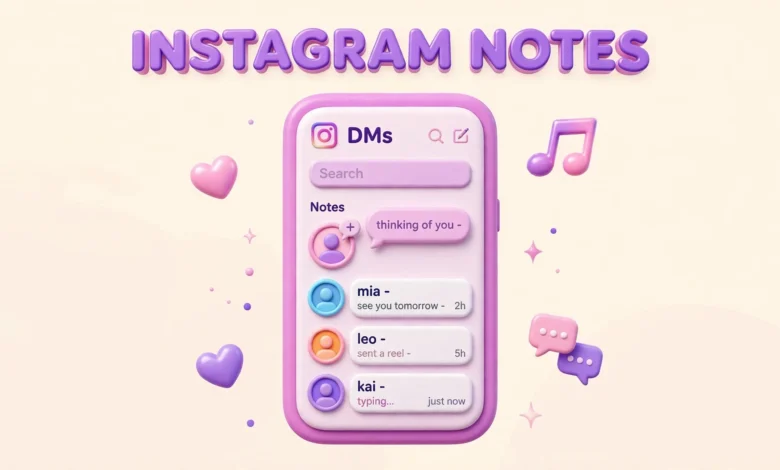
Instagram Notes are the smallest feature on the platform, and that is exactly why they work. A Note is a short message of up to 60 characters that sits at the top of your followers’ DM inbox for 24 hours. No image, no video, no editing, no algorithm deciding whether it deserves to be seen. Your followers open their inbox and there it is, right above their conversations.
Most creators ignore Notes because they look too simple to matter. That is a mistake. A Note is the closest thing Instagram has to a tap on the shoulder: it will not bring thousands of new followers, but it can start a real conversation with people who already follow you.
What Are Instagram Notes?
Instagram Notes launched as a lightweight way to share a thought with the people you are connected to. You write up to 60 characters, and the Note appears at the top of the DM inbox of the people who can see it. It stays visible for 24 hours, then disappears on its own. You can only have one Note active at a time, and posting a new one replaces the old one immediately.
Think of a Note as a status line rather than a post: a nudge, a teaser, or a question in 60 characters or less.
Who Actually Sees Your Notes?
This is the detail most guides skip, and it changes how you should use Notes. Your Note is not shown to all of your followers. It is shown to people you follow back, in other words mutual followers, or to the people on your Close Friends list if you choose that audience. A follower you do not follow back will not see your Note at all. Notes speak to your inner circle, not your whole audience.
When you create a Note, Instagram lets you pick the audience. Share it with followers you follow back, or limit it to Close Friends only. The Close Friends option is useful for testing an idea or giving a small group early news. Just remember that a Close Friends Note stays inside that circle.
- Mutual followers see your Notes in their DM inbox.
- Close Friends see a Note limited to Close Friends.
- Followers you do not follow back see nothing.
- Non-followers cannot see your Notes at all.
How Do You Post an Instagram Note?
Posting a Note takes less than a minute, and the steps are the same on iPhone and Android. If you do not see the Notes option, update the app first, since availability varies by region and app version.
- Open Instagram and tap the messages icon to open your DM inbox.
- Tap your profile picture at the top of the inbox, above your conversations.
- Type your Note in up to 60 characters, keeping it short and clear.
- Choose your audience: followers you follow back, or Close Friends only.
- Tap Share to publish the Note for the next 24 hours.
- To change it, tap your Note again and write a new one.
- To delete it early, tap your Note and choose Delete note.
What Are Music Notes and Video Notes?
A music Note lets you attach a short clip of a song to your message, so followers see your words and hear a few seconds of music when they tap it. This works well for mood based Notes, song recommendations, or a hint about the sound in your next Reel. Pick a track that fits the message.
A video Note is a short selfie video that appears in the same spot at the top of the inbox. Instead of a static profile picture with text beside it, your followers see a two second looping clip of you. Video Notes feel more personal than text, which makes them good for greetings and launch day excitement. Use them sparingly: a looping video of your face in every follower’s inbox every day gets old fast.
What Are Notes on Your Profile?
Notes are no longer limited to the DM inbox. Instagram also shows your Note on your profile, so visitors see it when they land on your page. This turns a Note into a tiny headline for your account: a visitor reads your bio, sees your Note, and gets one more reason to check your latest post.
Keep your profile in mind when you write a Note. The same sentence is now visible in two places, so the best Notes are short, clear, and connected to something on your profile.
What Happens When Someone Replies to Your Note?
When a follower taps your Note and replies, the reply arrives as a direct message, not as a public comment. That matters, because it changes the kind of conversation Notes create. A Note reply is a private one to one chat between you and that follower. It does not boost your post in the algorithm and does not count as engagement on any post. What it does give you is a direct line to someone who cared enough to respond.
Treat those replies like gold, especially when you are small. Answer every reply, even if it is just a short thank you or a quick follow up question. A follower who replies to a Note and gets ignored learns not to reply next time. If you want more public comments too, our guide on how to get more Instagram comments covers the other side of that coin.
What Should You Write in a Note? 50+ Ideas for Creators
The hardest part of Notes is not the format, it is knowing what to say in 60 characters. Below are more than 50 idea patterns, grouped by purpose.
Launch teasers
- Something big drops tomorrow at 6pm.
- New video is 90 percent done.
- Tomorrow’s post took me 3 weeks.
- Hint: it involves my kitchen.
- Filming the biggest video yet today.
- Part 2 is coming, and it is wild.
- I finally finished the project.
- Countdown starts now, 24 hours left.
- Guess what I am launching Friday?
Questions that start conversations
- Reels or carousels, what do you prefer?
- What should I post about next?
- Morning person or night owl?
- Rate my last Reel, 1 to 10.
- What is your biggest struggle right now?
- Coffee or chai while you work?
- Should I start a series on this?
- What time do you usually scroll?
- One word: how is your week going?
Same-day pointers
- Going live in 30 minutes, join me.
- New Story is up, check the poll.
- Link in bio is updated, go see.
- Answering DMs for the next hour.
- Live Q and A tonight at 8.
- New highlight added, it is a good one.
- Posting at 6, do not miss it.
- Story replies are open, ask me anything.
- Check my latest Story for a surprise.
Behind the scenes
- Editing at 2am again, send help.
- Third take and still not happy.
- My setup today looks like a mess.
- Writing scripts all day today.
- This Reel took 40 clips to make.
- Brainstorming next week, ideas welcome.
- Filmed in one take, somehow it worked.
- New mic day, testing it now.
- Behind the scenes in my Stories.
New-post alerts
- New Reel is live, go watch it.
- Just posted my favourite photo yet.
- New carousel, swipe through it.
- The Reel you asked for is up.
- New post, and it is honest.
- Part 1 is live, part 2 tomorrow.
- Posted a tutorial, link in bio.
- Fresh Reel, tell me what you think.
Quick offers and calls to action
- Free template in bio, today only.
- DM me the word START for details.
- Two spots left for this week.
- Early access for Close Friends today.
- New guide is out, link in bio.
- Reply with YES and I will send it.
- Join my channel, link in Stories.
- Last chance, offer ends tonight.
How Do Notes Differ From Broadcast Channels?
Notes and broadcast channels both land in the DM inbox, so creators often confuse them, but they do very different jobs. A Note is a single short line, visible for 24 hours, seen only by mutual followers or Close Friends, and it invites a private reply. A broadcast channel is a lasting space where you send longer messages, photos, polls, and links to everyone who opted in to join.
Think of it this way: a Note is a whisper to your closest followers, and a channel is a newsletter to your willing subscribers. Notes are best for a quick nudge or a same day pointer. Channels are best for updates that should live longer than a day. Read our guide to Instagram broadcast channels for creators first, then use Notes to point people toward it.
What Are the Honest Limits of Instagram Notes?
Notes are a conversation starter, not a reach tool. They will not grow your account, bring you new followers, or make the algorithm show your posts to more people. Anyone promising that Notes will blow up your reach is selling hype. The audience is small by design, because only mutual followers and Close Friends see them. Judge Notes by the replies they start, not by follower growth.
Daily use can also annoy people. Your Note sits at the top of the inbox, and a follower who sees a new Note from you every morning will eventually stop reading them. A Note that says nothing, like a random emoji or a vague “hey”, trains people to ignore you. Two to four Notes per week is plenty.
Two more honest caveats. First, availability varies by region and app version, so a feature your friend has, like video Notes or music Notes, may not have reached your account yet. Second, the Notes on posts feature was removed in 2026, so Notes now live in the inbox and on profiles only. For the latest official details, check Instagram’s Help Center and Instagram for Creators.
What Is a Simple Weekly Notes Rhythm?
Notes work best as a light habit, not a daily chore. A simple rhythm keeps you visible to your closest followers without turning your inbox into a billboard. Pair Notes with the rest of your Instagram routine: our 30 day plan to grow on Instagram covers the posting and Stories side, and Notes slot neatly into it.
- Monday: a question that starts the week, like asking what followers want next.
- Wednesday: a behind the scenes Note about what you are working on.
- Friday: a launch teaser or a new post alert for the weekend.
- Occasional: a music Note or video Note when the moment fits.
Track what works by watching replies, not views. Instagram does not show you how many people saw your Note, so the only signal that matters is how many people bothered to answer. Notes reward creators who treat their closest followers like people, not an audience to broadcast at.
Frequently Asked Questions
How long does an Instagram Note last?
A Note lasts 24 hours, then disappears automatically. You can only have one Note active at a time, and posting a new Note replaces the old one immediately. You can also delete a Note early by tapping it and choosing Delete note.
Who can see my Instagram Notes?
Your Notes are visible to followers you follow back, or to your Close Friends list if you limit the audience. Followers you do not follow back cannot see your Notes, and neither can people who do not follow you.
Can you put music or a video in an Instagram Note?
Yes. A music Note attaches a short song clip to your message, and a video Note shows a short looping selfie video. Both are optional, and availability can vary by region and app version.
Do Instagram Notes help you grow followers?
Not directly. Notes are only seen by mutual followers or Close Friends, so they do not reach new people, and replies arrive as private DMs rather than public engagement. Their real value is starting conversations with the followers you already have.
Last updated: November 2026.