You have probably seen it in action. A creator posts a Reel and writes “Comment LINK and I will send you the guide” in the caption. Within seconds of commenting, you get a private message with the link. Nobody sat there typing that reply. It was an automation, and it is one of the most useful tools a growing creator can set up, if you use it within the rules.
This guide explains how Instagram DM automation works, what Meta actually allows, what ManyChat costs in 2026, and the honest risks the sales pages skip.
What Is Instagram DM Automation?
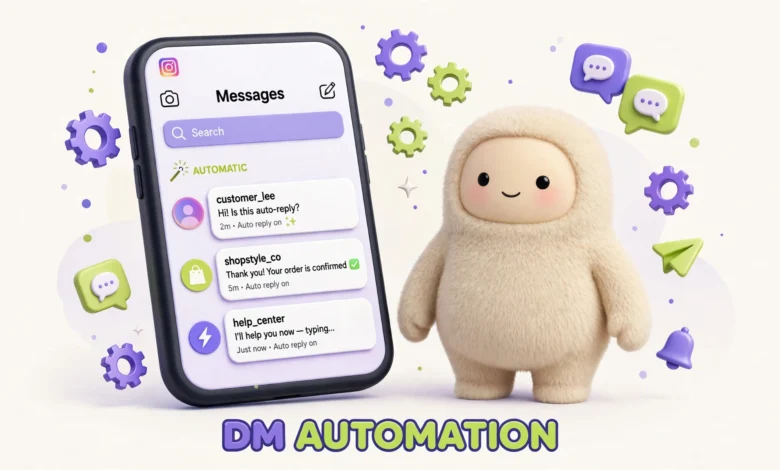
Instagram DM automation is software that sends messages on your behalf when a follower takes a specific action, usually commenting a keyword under your post. The best known tool for this is ManyChat, but the idea is the same across every tool.
The most common setup is the comment to DM flow. You post a Reel, you tell viewers to comment a word like LINK, GUIDE, or TEMPLATE, and when someone comments that word, the tool does two things. It posts a short public reply under their comment, and it sends them a private DM with the link you promised. The public reply shows other viewers the system works, which encourages more comments, and the DM delivers the value privately.
Why does this matter? A Reel with hundreds of comments gets shown to more people, and every comment that triggers a DM becomes a private conversation with someone who already showed interest. For a creator selling a guide, a template, or a course, that is a direct line from content to conversion. It also saves hours of manual replying.
How Does a Comment to DM Flow Actually Work?
The flow has five steps.
- You publish a Reel or post with a clear call to action: comment a specific keyword to get the link.
- A follower comments that keyword under your post.
- The tool detects the comment through Meta’s official API and posts a short public reply, usually something like “Check your DMs, just sent it”.
- The tool sends a private DM to that follower with the link, the file, or the next step.
- The follower opens the DM, clicks the link, and you have a warm lead who chose to hear from you.
The key detail is the official API. Legitimate tools like ManyChat connect to Instagram through Meta’s approved interface, which is why Meta allows them. They are not logging into your account with your password and pretending to be you. That distinction matters, because the unofficial tools that do log in as you are the ones that get accounts restricted or banned.
One more requirement: you need a professional Instagram account, either a business account or a creator account, to use DM automation. A personal account cannot connect to these tools. Switching to a professional account is free and takes a minute in your settings, and it also unlocks insights, so most serious creators have already made the switch.
The Meta API Rules You Need to Know
Meta sets strict limits on what automation can do, and these limits shape how you should design your flows. Ignore them and your messages will fail.
- One private reply per comment. Each comment can trigger exactly one private message from your automation.
- The private reply must be sent within 7 days of the comment. After that window closes, the tool cannot message that person about that comment.
- Once the person replies to your DM, you can keep talking, but only within a 24 hour window from their last message.
- Only the person’s first comment under a post triggers the flow. If the same person comments the keyword three times, you still get one automation, not three.
These rules mean your automation is a conversation starter, not a broadcast channel. You cannot message people out of nowhere, you cannot follow up forever, and you cannot spam someone who commented once. That is by design, to protect users from aggressive messaging.
Design your flow around these limits. Send the link in the very first DM, because you may not get a second chance. Keep the message short, with one link and one next step. If you want a longer conversation, ask a question in that first message so the person replies, which opens the 24 hour window. Automation starts conversations, it does not replace answering real questions yourself.
How Much Does ManyChat Cost in 2026?
ManyChat is the tool most creators use. Pricing is based on the number of active contacts, the people your automation actually talks to in a given month.
- Free plan: up to 25 active contacts a month, with basic features. Enough to test the system, but not enough for a popular Reel.
- Essential plan: $17 per month, or $14 per month billed yearly, for more contacts and more features.
- Pro plan: $39 per month, or $29 per month billed yearly, for larger audiences and advanced automation features.
Prices are as of November 2026 and can change, so check the ManyChat pricing page before you commit. The important honest caveat is that costs climb with your audience. The free plan runs out fast after one popular Reel, because 25 contacts can disappear in a single afternoon if a post takes off. Once you pay, the bill grows per extra contact, so budget for that growth before you build your whole lead flow on a tool whose price scales with your success.
Alternatives to ManyChat
ManyChat is the biggest name, but it is not the only option, and for some creators it is not the best one. The alternatives below all work through the same official Meta API, so the same rules and limits apply.
- Inro, a newer tool built specifically for Instagram DM automation, with a clean interface and strong analytics for creators.
- Chatfuel, a long running chatbot platform that supports Instagram alongside other channels.
- LinkDM, a focused tool for comment to DM flows, often cheaper than ManyChat for small creators who only need that one job done.
- InstantDM, another focused option for creators who want simple keyword triggers without a large platform to learn.
When you compare tools, look past the headline price. Check the contact limits, the cost of going over them, and whether the tool charges per contact or per conversation. Try the free tier of two tools on similar Reels and compare the results. The tool that is easiest for you to set up correctly is the right one.
For an independent deep dive into ManyChat on Instagram, including setup detail and pricing analysis, see the reviews at Kevin Welter and PromptWises.
How to Set Up Your First Automation
Setting up your first comment to DM flow takes about thirty minutes. Test everything before you publish the Reel that triggers it.
- Switch your Instagram account to a professional account, business or creator, in your settings if you have not already.
- Create an account on your chosen tool and connect your Instagram account through the official login flow. Never type your Instagram password into a third party tool.
- Create a new automation and choose the comment trigger as the starting point.
- Set the keyword, a short word like LINK or GUIDE, and choose which post or Reel the automation applies to.
- Write the public reply, short and friendly, confirming the DM is on its way.
- Build the private reply: a short greeting, the link, and one clear next step. Keep it under a few lines.
- Test the whole flow from a second account. Comment the keyword, check the public reply appears, and open the DM to confirm the link works.
- Only then publish the Reel with the call to action in the caption.
The test step is the one most beginners skip, and it is the one that matters most. A broken link in an automation goes out to dozens or hundreds of people before you notice, and every one of them gets a bad first impression. Test with a second account, fix what breaks, and test again.
Honest Caveats Before You Pay
DM automation has real benefits, but the honest picture includes warnings that rarely appear in the sales pages. Read these before you spend money or build your whole funnel on a tool.
First, the free plan runs out fast. Twenty five active contacts sounds reasonable until a Reel gets shared and fifty people comment the keyword in an hour. Then your automation stops for the rest of the month, and the people who commented after the limit get nothing.
Second, ManyChat’s reputation with users is poor. Its Trustpilot score is around 2.0 out of 5, with complaints about billing, support, and unexpected charges. That does not mean the tool fails at its job, many creators use it successfully every day, but it does mean you should read the billing terms carefully and watch for automatic upgrades when you pass a contact limit.
Third, reword your auto replies regularly. Instagram’s spam filters notice when the same message goes out hundreds of times, and identical replies can get flagged even when everything is within the rules. Change the wording every few weeks and keep the message sounding like a person wrote it.
Fourth, and most important, never use unofficial automation tools that log into your Instagram account. Tools that ask for your password, run bots that like and follow on your behalf, or automate actions outside the official API put your account at real risk. Instagram detects this behaviour and can restrict or ban the account. The money you save on a cheap unofficial tool is nothing compared to losing an account you spent years building.
Best Practices That Keep Your Account Safe
Automation works best when it feels like a helpful shortcut, not a robot taking over your account. A few habits will keep your flows effective and your account in good standing.
- Use automation for one clear job per post, usually delivering a single link or resource.
- Keep the keyword simple and easy to spell, so followers do not mistype it.
- Answer real questions yourself, quickly, once the automation has delivered the link.
- Check your automation weekly to confirm the link still works and the wording still fits.
- Turn off a flow when the offer ends, so nobody gets a dead link months later.
Pair automation with content that earns comments in the first place. The flow only works if people comment, and people only comment when the Reel is worth responding to. Our guide on how to get more Instagram comments covers the content side, and our list of Instagram Reels content ideas for 2026 will give you posts worth automating. Fit it into our 30 day plan to grow on Instagram.
Frequently Asked Questions
Is Instagram DM automation allowed?
Yes, when it runs through Meta’s official API, as tools like ManyChat do. Automation is not allowed when it uses unofficial tools that log into your account or fake your activity. Those tools can get your account restricted or banned.
Do I need a business account for DM automation?
Yes, you need a professional account, either business or creator. A personal account cannot connect to automation tools. Switching is free in your account settings and also unlocks insights, so most creators switch.
How much does ManyChat cost for Instagram?
As of November 2026, the Free plan covers 25 active contacts a month, Essential costs $17 a month or $14 a month billed yearly, and Pro costs $39 a month or $29 a month billed yearly. Costs rise as your contact count grows, so check the current pricing page before you commit.
How many times can automation message someone?
Each comment triggers exactly one private reply, which must be sent within 7 days. If the person replies to your DM, you can continue the conversation within a 24 hour window from their last message. Only their first comment under a post triggers the flow.
Last updated: November 2026.