Internal links are links from one page on your website to another page on the same website. They are easy to overlook, yet they shape how search engines discover your content, how authority flows through your site, and how visitors move from one helpful article to the next. A thoughtful WordPress internal linking strategy does not require an SEO plugin or a large site. It requires a clear structure, consistent habits, and regular maintenance.
This guide is written for beginners with a small or growing blog. You will learn what internal links do, how to build a pillar and cluster structure, how many links to add, how to write anchor text, and how to run a simple monthly routine that keeps your site healthy as it grows.
What Do Internal Links Actually Do?
Internal links help in three main ways. First, they help search engines crawl your site. A crawler follows links to find new pages, so a page with no incoming internal links can stay undiscovered for a long time. Second, they pass authority. When a strong page links to a newer page, it signals that the newer page is related and worth attention. Third, they help visitors. A reader who finishes one article should find a natural next step, not a dead end.
Think of your site as a small town. Your homepage is the main road, your pillar pages are major landmarks, and your cluster posts are nearby streets. Internal links are the signs that connect them. Without signs, visitors and search engines wander, miss good content, and leave early. With clear signs, everyone finds more value in one visit.
How Does a Pillar and Cluster Structure Work?
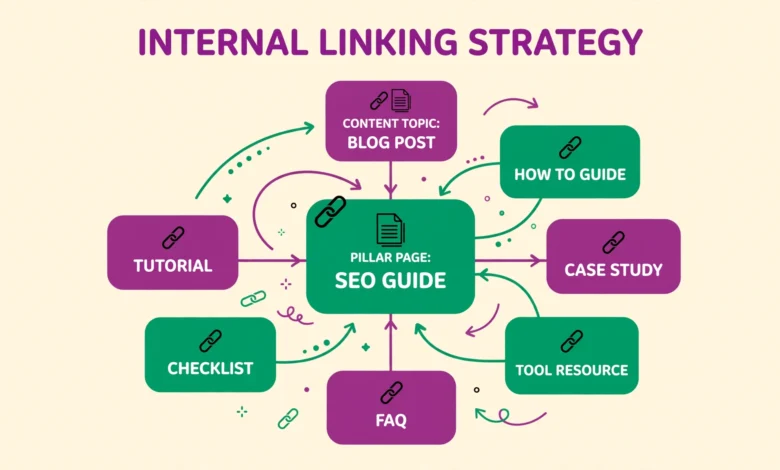
A pillar page covers a broad topic in a useful overview. Cluster posts cover narrow subtopics in depth, and each cluster post links back to the pillar. The pillar links out to each cluster post. This structure tells search engines that your site covers the topic thoroughly, and it gives readers a clear path to explore.
For a small blog, start with one pillar per major category. For example, a WordPress blog might have pillars for WordPress basics, SEO, and hosting. Under the SEO pillar, cluster posts could cover image SEO, categories, sitemaps, and internal linking itself. You do not need dozens of posts to start. Five to eight related posts around one pillar already form a useful cluster.
Good image habits support this structure too. Learning WordPress image SEO tips helps your cluster posts load fast and rank for image searches, while clear organization through WordPress categories versus tags keeps each cluster easy to browse. Structure and linking work together, not separately.
How Many Internal Links Should You Add Per Post?
There is no magic number, but a practical range for most blog posts is three to eight relevant internal links. A short post may only need three. A long guide of 1,500 words or more can naturally support six to eight without feeling forced. The key test is relevance. Every link should help the reader understand the current topic better or take a logical next step.
Do not add links just to hit a number. Ten irrelevant links hurt readability and dilute the value of the links that matter. Likewise, do not publish a post with zero internal links unless it is truly standalone. Aim for a natural flow where links appear where a curious reader would want them, usually in the introduction, in the body where a related concept is mentioned, and in a related reading section near the end.
- Link to the pillar page when you mention the broad topic.
- Link to one or two cluster posts that expand on a specific point.
- Link to a practical tutorial when a reader needs steps, not theory.
- Link to a newer post from older posts once the new post is published.
How Should You Write Anchor Text?
Anchor text is the clickable words in a link. Descriptive anchor text tells both readers and search engines what the linked page is about. For example, linking the phrase WordPress image SEO tips is far more helpful than linking the phrase click here. Readers know what they will get, and search engines understand the topic connection.
Avoid two common mistakes. First, avoid vague anchors like click here, read more, and this article. They waste a chance to describe the destination. Second, avoid repeating the exact same keyword anchor to the same page in every post. If every post links with the identical phrase, it looks manipulated. Vary your anchors naturally while keeping them accurate. Use the page title, a partial phrase, or a natural sentence fragment that fits the context.
Also avoid linking the same page many times inside one post. One well placed link is usually enough, unless the post is very long and the reader would benefit from a second link in a different section. Too many repeated links clutter the text and add little value.
How Do You Link New Posts From Old Posts?
Publishing a new post is only half the job. If no older post links to it, it may receive little traffic and take longer to rank. Make it a habit to update two or three older, related posts every time you publish something new. Find the posts that already get traffic, add a natural sentence that mentions the new topic, and link to the new post from there.
This habit is powerful because older posts often rank already. A link from a ranking post passes visibility to the new post faster than waiting for search engines to find it alone. It also improves the older post, because readers get fresh, related information instead of outdated advice. Keep a simple spreadsheet or note of your pillar pages and top posts so you can find linking opportunities quickly.
For navigation and discovery, an HTML sitemap page can also help visitors find older content. Learning how to add an HTML sitemap in WordPress without a plugin gives readers one more clear path through your site, which complements contextual links inside posts.
What Are Orphan Pages and Why Do They Matter?
An orphan page is a page with no incoming internal links from other pages on your site. It may still be reachable from the menu or sitemap, but if no article links to it, readers rarely discover it through browsing, and search engines may treat it as less important. Orphans often happen when a post is published quickly and never linked from related content.
To find orphans, use your SEO plugin report, a site audit tool, or a manual check. In WordPress, you can review your posts list and ask a simple question for each post: does at least one other post link to it? If not, add it to your linking list. Link it from its pillar page and from one or two cluster posts where it fits naturally. Fixing orphans is one of the fastest wins for a small blog.
How Do You Check for Broken Internal Links?
Broken internal links happen when you change a slug, delete a post, or move content without updating links. A broken link frustrates readers and wastes crawl effort. Check your site regularly with a broken link checker plugin or an external audit tool. Many tools scan your whole site and list broken links with the source page, so you can fix them in one pass.
When you change a URL, set up a redirect from the old URL to the new one. When you delete a post, either redirect it to the closest related post or remove links pointing to it. Do not leave dead links in published content. A monthly broken link check is enough for most small blogs, and it pairs well with the routine below.
Should You Use Breadcrumbs?
Breadcrumbs are the small navigation trail at the top of a page, such as Home, then Blog, then Post Title. They show readers where they are and let them jump back to a category or homepage in one click. Breadcrumbs also create consistent internal links across your site, which helps search engines understand hierarchy.
Most SEO plugins and many themes can add breadcrumbs with a simple toggle. Turn them on if your theme supports them cleanly, and make sure they match your category structure. Breadcrumbs are not a replacement for contextual links inside your content, but they are a useful extra layer of navigation, especially on larger sites.
How Should You Use Rank Math and Yoast Link Suggestions?
Rank Math and Yoast both offer internal link suggestions in the editor. These suggestions scan your content and recommend older posts to link to. They save time, especially when your site grows beyond fifty posts and you cannot remember every related article. Use them as a starting point, not as an autopilot.
Review each suggestion before accepting it. Ask whether the suggested post truly helps the reader at that exact point in the article. Reject suggestions that are only loosely related, even if the plugin scores them highly. Never enable automatic linking that inserts links without your review. Auto linking often creates awkward anchors, links the same page too often, and links to posts you would not choose yourself. For authoritative background, developer.wordpress.org and developers.google.com offer useful documentation on site structure and search guidance.
What Does a Simple Monthly Internal Linking Routine Look Like?
A routine keeps linking consistent without taking hours. Once a month, set aside thirty to forty five minutes and work through a short checklist. This routine works for blogs with twenty posts and for blogs with two hundred posts, because the steps stay the same and only the volume changes.
- Review new posts from the past month and link each one from its pillar page.
- Update two or three older high traffic posts with links to new posts.
- Find orphan pages and add at least one contextual link to each.
- Run a broken link check and fix or redirect any broken links.
- Check your pillar pages to confirm every cluster post is linked and up to date.
Write down what you changed in a simple log. Over time, the log shows which pillars are growing, which posts need more links, and which topics deserve a new cluster. Internal linking is not a one time task. It compounds. Each new post strengthens the older posts it links to, and each update to an older post gives new posts a faster start.
Frequently Asked Questions
How many internal links should a beginner add to each post?
Aim for three to eight relevant links per post. Short posts need fewer, long guides can support more. Relevance matters more than the exact count, so only link where it helps the reader.
Is it bad to use the same anchor text for every internal link?
Yes, if you repeat the exact keyword anchor everywhere, it can look manipulated. Vary anchors naturally with titles, partial phrases, and sentence fragments that still describe the destination accurately.
What is the fastest way to fix orphan pages?
Link each orphan from its pillar page and from one or two related cluster posts. That single change usually restores discovery, traffic, and ranking potential for the orphaned page.
Should beginners use automatic internal linking tools?
Use link suggestions for ideas, but review every link yourself. Automatic linking without review often adds irrelevant links and awkward anchors, so manual approval is the safer choice for beginners.
Last updated: October 2026.