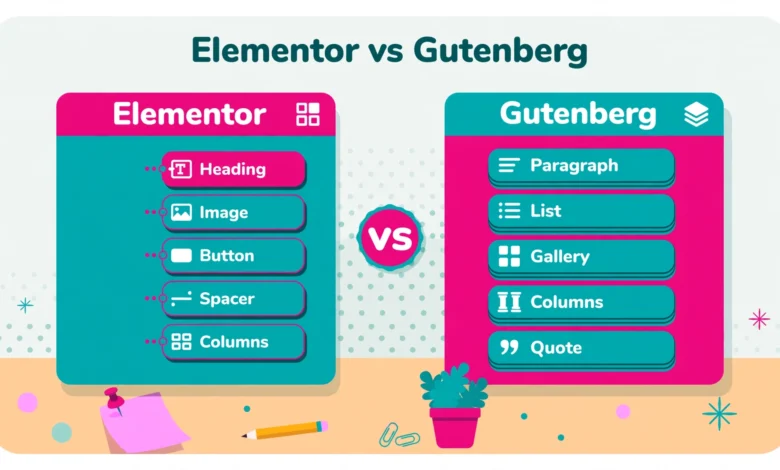
Every WordPress user eventually faces the same question: should I build pages with Elementor or with Gutenberg? Elementor is the most popular third party visual page builder, used on millions of sites, while Gutenberg is the block editor built into WordPress core, the default tool every WordPress install already has.
Both can build beautiful pages, but they work in very different ways, and the right choice depends on what kind of site you run. This comparison looks at the factors that actually matter: ease of use, design freedom, page speed and Core Web Vitals, pricing, templates, SEO, WooCommerce support, portability and lock in, and long term maintenance. The verdict by use case comes at the end.
What Is Elementor and What Is Gutenberg?
Elementor is a third party visual builder plugin. You install it like any plugin, open a page, and drag widgets onto a live canvas where you see the design exactly as visitors will see it. It replaces the normal WordPress editing experience with its own editor, its own widget library, and its own theme builder in the Pro version. You can explore its features on Elementor.com before you install it.
Gutenberg is the WordPress core block editor, the default editor since WordPress 5.0. It builds pages from blocks: paragraph blocks, image blocks, heading blocks, columns, buttons, and more, arranged in the same editor where you write posts. Because Gutenberg ships with WordPress, there is nothing to install and nothing extra to pay for. For background on the editing screens, see our beginner guide to the WordPress dashboard.
Which Builder Is Easier to Use?
Elementor wins on ease of use for design work. Its drag and drop canvas is visual from the first minute: you pull a heading widget onto the page, type in it, drag a slider to change the size, and watch it update live. There is no gap between editing and previewing, which suits beginners and clients who tweak their own pages.
Gutenberg is easier in a different way. Because it is the default editor, there is nothing new to learn before you start writing, and the experience is the same for posts and pages. Adding a block, typing, and publishing feels natural if your main job is writing. Complex layouts take more steps in Gutenberg than in Elementor. The summary is simple: Elementor is easier for designing, while Gutenberg is easier for writing.
Which Builder Gives You More Design Freedom?
Elementor gives you far more design freedom out of the box. Its free version includes dozens of widgets, from image carousels and accordions to forms and pricing tables, and the Pro version adds a theme builder, popup builder, form builder, and dynamic content. You can control margins, padding, motion effects, custom positioning, and responsive behavior per device, all from visual controls.
Gutenberg design freedom has grown a lot, especially with Full Site Editing and the pattern library, but it is still more limited. Block themes offer global styles, templates, and reusable patterns, yet fine control such as custom positioning or advanced animations often needs custom CSS or an extra blocks plugin. For a clean blog or business site, Gutenberg is enough. For a bold, heavily designed marketing site, it can feel restrictive. See our Elementor Free vs Pro comparison for the paywalled features.
Which Builder Is Faster for Page Speed and Core Web Vitals?
Gutenberg is clearly the lighter option. It is part of WordPress core, so it adds very little extra code to a page. Its output is clean, semantic HTML with minimal CSS and JavaScript, which helps Largest Contentful Paint and keeps total page weight low. That lightness shows up directly in Core Web Vitals scores.
Elementor adds weight to every page it builds. It loads its own CSS and JavaScript files, plus the styles of every widget used on the page, and the editor stores extra markup in the database. A well optimized Elementor site on good hosting can still pass Core Web Vitals, but it takes more work: caching, image optimization, and careful widget use. If speed is your top priority, Gutenberg has a real and lasting advantage. Hosting quality matters for both builders, and our web hosting guide explains how server speed and caching affect whichever builder you choose.
How Do Elementor and Gutenberg Compare on Pricing?
Gutenberg costs nothing. It ships with WordPress, it has no premium version, and every feature, including Full Site Editing, is free. You might pay for a premium block theme or a blocks plugin, but the editor itself will never send you a renewal notice.
Elementor follows a freemium model. The free version is genuinely useful and powers millions of sites, covering basic pages, forms, and layouts. Elementor Pro unlocks the theme builder, WooCommerce builder, popup builder, advanced forms, and premium widgets, starting at a yearly subscription per site, with higher tiers for multiple sites. The cost is modest for a business site, but it is recurring, and letting it lapse means losing the Pro widgets on your pages until you renew.
Which Builder Has Better Templates?
Elementor has the larger template library by a wide margin. It ships with hundreds of full page templates and block kits for home pages, landing pages, portfolios, and shops, plus a huge ecosystem of third party template packs. You can import a complete designed page, swap in your own text and images, and publish in an afternoon.
Gutenberg offers patterns instead of full templates: reusable block arrangements for heroes, galleries, call to action sections, and pricing tables, available from the WordPress pattern directory and from block themes. Patterns are free and growing fast, but they are smaller building blocks rather than complete designed pages. You assemble a page from several patterns instead of importing one finished design, which takes more time and more design judgment.
Which Builder Is Better for SEO?
For on page SEO, the two builders are closer than most people think. Search engines read your content, headings, images, and structured data, not the editor you used. Gutenberg has a small edge because its output is lighter and faster, and speed is a ranking factor, and because its clean heading structure is easy for crawlers to follow. Elementor pages can rank just as well, but they need more optimization work to reach the same speed.
Both builders work with the same SEO plugins, such as Rank Math and Yoast, and both let you control titles, meta descriptions, image alt text, and schema markup. Your content quality, internal linking, and site structure matter far more than your builder. Our guides on adding Google Search Console to WordPress and on WordPress internal linking strategy cover the SEO fundamentals that move rankings, and our image SEO guide covers image optimization for search in either editor.
Which Builder Works Better With WooCommerce?
Elementor Pro includes a dedicated WooCommerce builder that lets you design the single product page, shop page, cart, and checkout visually, with widgets for prices, ratings, add to cart buttons, and related products. That control is valuable for stores where product page design drives sales. The free version of Elementor works with WooCommerce too, but without the dedicated shop widgets.
Gutenberg works with WooCommerce through blocks. WooCommerce ships product blocks for grids, categories, and featured products, and Full Site Editing lets you customize shop templates with blocks. The result is lighter and faster, which helps conversion, but the design control is less complete than Elementor Pro, especially for custom checkout layouts. For a store where the product page is a sales tool, Elementor Pro earns its cost.
What About Portability and Lock In?
This is Gutenberg’s biggest long term advantage. Content built with Gutenberg is stored as standard blocks in the WordPress database. If you deactivate a blocks plugin or switch themes, your content stays readable and editable, because blocks are part of core.
Elementor stores its layouts as shortcodes and metadata tied to the plugin. If you deactivate Elementor, your pages do not vanish, but they lose their design: sections collapse into plain text and shortcode fragments, and you must rebuild each page in another tool. That is real lock in, and it matters if you plan to sell the site or hand it to a client who dislikes Elementor.
Maintenance matters too. Gutenberg updates with WordPress core and never needs a license renewal, while Elementor needs more upkeep: frequent releases, Pro license management, and compatibility checks before major updates.
Can You Use Elementor and Gutenberg Together?
Yes, and this is the option many experienced WordPress users choose. Use Gutenberg for blog posts, standard pages, and anything content heavy, where speed and portability matter most. Use Elementor only for the pages where design freedom earns its cost: the home page, landing pages, sales pages, and custom layouts.
The hybrid approach has one rule: keep the split clean. Do not build the same page in both editors, and do not use Elementor for a page you may later want to edit in Gutenberg, because moving a page between editors means rebuilding it. Decide the editor when you create the page, and stick with it. Our guide on Elementor containers vs sections explains the current layout system.
Elementor vs Gutenberg: The Verdict by Use Case
- Content heavy blog or news site: choose Gutenberg. It is faster, free, portable, and it stays out of the way while you write.
- Design heavy marketing or business site: choose Elementor. The visual canvas and templates save hours and produce polished pages.
- Client and agency work: choose Elementor Pro. Templates speed up delivery, and clients find the visual editor easy to use.
- Speed first site on a tight budget: choose Gutenberg. No subscription, no extra weight, and the lightest path to strong Core Web Vitals.
- Small WooCommerce store: either works: Gutenberg for speed, Elementor Pro if product design drives sales.
- Long term project you may sell or hand over: choose Gutenberg, or the hybrid approach so most content stays portable.
- Best of both: use Gutenberg for posts and standard pages, and Elementor for landing pages and the home page.
There is no single winner, only a better fit for your site. Pick the one that matches how you actually work, and if you are still unsure, start with Gutenberg and add Elementor only for the pages that need it.
Frequently Asked Questions
Is Gutenberg free while Elementor costs money?
Yes. Gutenberg ships with WordPress core and costs nothing. Elementor has a useful free version, but the Pro version with the theme builder and WooCommerce builder is a yearly subscription.
Is Elementor slower than Gutenberg?
Yes, in general. Gutenberg output is lighter because it is part of core, while Elementor loads extra CSS and JavaScript on every page it builds. A well optimized Elementor site can still pass Core Web Vitals, but it needs more optimization work.
Can I switch from Elementor to Gutenberg later?
You can, but it is not a one click move. Deactivating Elementor strips the design, so each page must be rebuilt with blocks. That is why many users keep posts in Gutenberg and use Elementor only for landing pages.
Do I need Elementor if my theme already looks good?
Probably not. If your theme plus Gutenberg patterns already give you the layout you want, adding Elementor only adds weight and maintenance. Add it only when you need a layout Gutenberg cannot build.
Last updated: November 2026.