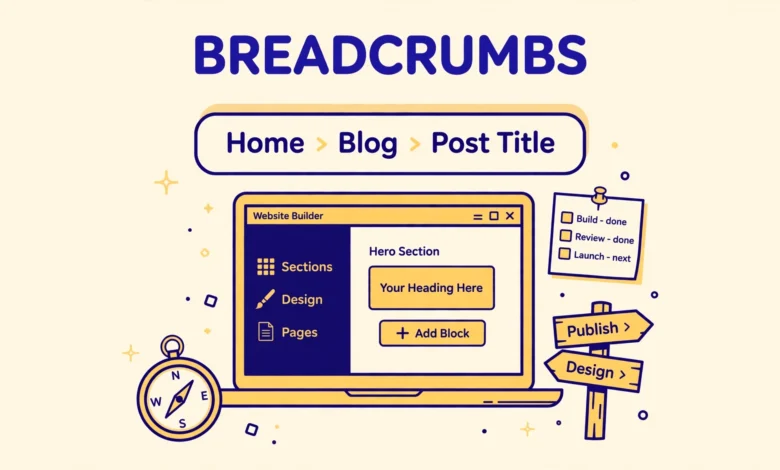
Breadcrumbs are the small trail of links at the top of a page, usually reading something like Home, then Blog, then the post title. They tell visitors exactly where they are on your site, and they give them a one click path back to any parent page. They also help search engines understand the structure of your site, which is why most well organised sites show them on every post and page.
Here is the honest starting point: Elementor Free has no built in breadcrumbs widget. You can search the widget panel as long as you like, and you will not find one. That does not mean you need Elementor Pro or a paid addon. You can add breadcrumbs for free with a free addon widget, or with the breadcrumb feature already inside Rank Math or Yoast SEO. This guide covers both free routes, shows how to place breadcrumbs in a template, and explains how to style them and when to hide them.
Does Elementor Free have a breadcrumbs widget?
No. Breadcrumbs are not included in the free version of Elementor, and they are not included in Elementor Pro either. Elementor simply does not ship a breadcrumbs widget in either version. That surprises many users, because breadcrumbs feel like a basic page element, but the feature has always been left to SEO plugins and addons.
The good news is that the free options are solid. The cleanest choice for most sites is the breadcrumb feature in your SEO plugin, because it already knows your site structure, categories, and page hierarchy. The second choice is a free addon widget, which gives you more visual control inside the editor. Either route works with Elementor Free, and you can set either one up in about fifteen minutes. If you already use Rank Math or Yoast SEO, use the SEO plugin route; if not, the free addon route is simpler. Our Elementor Free vs Pro comparison is a useful companion read if you are still deciding what the free version can and cannot do.
How do I add breadcrumbs with a free Elementor addon?
Several free addons include a breadcrumbs widget. Two reliable options are The Plus Addons for Elementor, which includes a Breadcrumbs Bar widget, and Animation Addons for Elementor, which includes a Breadcrumbs widget. Both are free in the WordPress plugin directory, and both work inside the normal Elementor editor.
- Go to Plugins, then Add New, search for The Plus Addons for Elementor or Animation Addons, install it, and activate it.
- Open a page or template in the Elementor editor and find the new Breadcrumbs widget in the widget panel.
- Drag the widget to the top of the page, above the title or above the main content, and the breadcrumb trail appears immediately.
- Open the Content tab and set the separator, such as a slash or a small arrow, and choose whether the home link shows a house icon or the word Home.
- Use the Style tab to set the text colour, link colour, hover colour, and font size so the trail matches your theme.
Watch the plugin weight before you install a big addon for one widget. Some addon packs add dozens of widgets and extra scripts to every page, which can slow your site down. If you only need breadcrumbs, consider the SEO plugin route below, which adds no new plugin at all. If you already use the addon for other widgets, its breadcrumbs widget costs you nothing extra. Keep the widget in a template rather than on single pages, so every page gets breadcrumbs automatically. Our guide to Elementor containers vs sections explains the structure your breadcrumb widget will sit inside.
How do I add breadcrumbs with Rank Math or Yoast SEO?
Rank Math and Yoast SEO both include a breadcrumbs feature that builds the trail from your real site structure. Rank Math offers it in the free version, and Yoast SEO offers it in the free version too. This is the route we recommend, because the plugin already understands your categories, your parent pages, and your post types, and because it adds the structured data that helps search engines show your breadcrumbs in search results.
In Rank Math, go to Rank Math SEO, then General Settings, then Breadcrumbs, and turn the feature on. You can set the separator character, the home label, and whether the home link shows on the front page. In Yoast SEO, go to Yoast SEO, then Settings, then Breadcrumbs, and turn the feature on there, with similar options for the separator and the home label. Either plugin will then generate the breadcrumb trail for every page, and the only remaining job is to display it.
Displaying the trail without a shortcode or code is straightforward in both plugins. Rank Math provides a Breadcrumbs block for the Block Editor, and Yoast SEO provides its own Breadcrumbs block in the same way. To use it inside an Elementor template, the simplest path is the route described in the next section, where the breadcrumb block sits in a header or single post template. Google Search Central also explains how breadcrumbs appear in search results, which is worth reading if you care about the SEO side as well as the design side.
How do I show breadcrumbs in an Elementor header template?
Adding breadcrumbs to single pages one by one is tedious and easy to forget. The right place for them is a template, so every post and page inherits them automatically. Elementor Free does not include the Theme Builder, so you have two realistic options here, and both are free.
- Use your theme. Many themes, including the free Hello Elementor theme and most popular free themes, have a spot for breadcrumbs in their header or single post layout, or they accept a breadcrumb block in a template part.
- Use a free template plugin. Plugins such as Elementor Header and Footer Builder let you build a header or a single post template with the Elementor editor and drop your breadcrumb widget or block into it.
- Place the breadcrumb widget at the very top of the template, directly above the post title, with a small amount of spacing below it.
- Preview the template on a post, a page, and a category archive to confirm the trail reads correctly on each type.
If you do have Elementor Pro, the job is simpler: open Theme Builder, edit your Single Post template, and drag the breadcrumb widget into the top of the template. But the free routes above get you the same result without paying. After the template is saved, check that breadcrumbs appear once per page and in the right place. A common mistake is adding them to both the header template and the single post template, which shows the trail twice. Pick one place and keep it there. If you are building out your site structure, our WordPress internal linking strategy guide pairs well with breadcrumbs, because both help visitors and search engines move through your content.
How do I style breadcrumbs in Elementor?
Breadcrumbs should be visible but quiet. They are navigation, not decoration, so the best styling is subtle, consistent, and easy to read. Most addon widgets give you full style controls, and the SEO plugin breadcrumbs can be styled with a small amount of CSS.
- Separator. A simple slash or a small chevron reads best. Avoid long dashes, stars, or decorative characters that distract from the links.
- Font size. Keep breadcrumbs one step smaller than your body text, around 13 to 14 pixels, so they sit quietly above the title.
- Colour. Use a muted grey for the links and a slightly darker tone for the current page, which is not a link. The current page name should never look clickable.
- Hover state. Give links a clear hover colour or underline so visitors know they can click them.
- Alignment. Left aligned works on most layouts. Centre alignment suits narrow centred designs, but avoid it on wide layouts where the title is left aligned.
- Spacing. Leave a little breathing room above and below the trail so it does not crowd the header or the title.
If your SEO plugin outputs breadcrumbs as plain HTML with no style controls, add a few lines of CSS in the Customizer under Additional CSS, targeting the breadcrumb container class your plugin uses. That keeps the styling in one place and lets you adjust it without editing any template. See our guide on how to add custom CSS in WordPress for the Customizer route and the safest way to add small style rules. For a deeper look at site wide text and colour, our guide to Elementor global colours and fonts shows how to keep breadcrumb styling consistent with the rest of your site.
Should I show breadcrumbs on the homepage?
No. The homepage is the root of your site, so a breadcrumb trail there would read Home, then Home again, or just a single Home link that goes nowhere useful. Hide breadcrumbs on the homepage and show them everywhere else. Both Rank Math and Yoast SEO have a setting to hide breadcrumbs on the front page, and most addon widgets have a toggle for the same thing. If your template shows breadcrumbs on the homepage anyway, check the plugin setting first, then check whether your template excludes the front page.
The same logic applies to pages that are already at the top level, such as a standalone contact page with no parent. A trail that reads Home, then Contact is still useful, because it shows the visitor the way back, but a trail with only one item is not. Most breadcrumb systems handle this sensibly by default, so you rarely need to think about it. The main rule is simple: breadcrumbs exist to show the path back up, and a page with no path needs none.
Breadcrumbs are a small feature with an outsized effect. They make deep content feel reachable, they reduce the number of visitors who land on a post and leave because they cannot find their way around, and they give search engines a clearer picture of your site structure. Elementor Free may not ship the widget, but a free addon or the SEO plugin you already use gets you there in minutes, and once the trail lives in a template, every new post inherits it without any extra work.
Frequently asked questions
Does Elementor Free have a breadcrumbs widget?
No. Elementor Free has no built in breadcrumbs widget, and neither does Elementor Pro. Use a free addon widget such as The Plus Addons Breadcrumbs Bar or Animation Addons Breadcrumbs, or use the breadcrumb feature in Rank Math or Yoast SEO.
Which is better: a free addon or Rank Math breadcrumbs?
The SEO plugin route is better for most sites, because Rank Math and Yoast already know your site structure and add the structured data search engines use. The addon route is better if you want more visual control inside the editor or if you do not use an SEO plugin.
Can I add breadcrumbs in Elementor without any code?
Yes. Both routes in this guide need no code. The addon widget is dragged in like any other widget, and the Rank Math and Yoast breadcrumb blocks can be placed without writing anything. Styling is optional, and it uses the editor controls or a few lines of CSS.
Do breadcrumbs help SEO?
Yes, in a supporting role. Breadcrumbs help search engines understand your site structure, and when the structured data is present, Google can show the breadcrumb trail in search results instead of a plain URL. They also improve internal navigation, which keeps visitors on your site longer.
Last updated: November 2026.